
How to add funds to your PayPal account

How to add funds to your PayPal account

This tutorial will show you how to add funds to your PayPal account

1) Click Add Funds

This screen will show you what options are available to you to add funds to your account. For the purpose of this tutorial, we will add funds using a bank account. Note that this method can take up to 5 business days to process
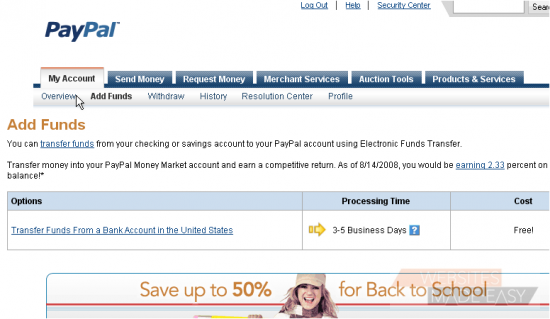
2) Click the Transfer Funds link

Make sure the correct bank is selected from the drop-down list

3) Enter the amount you would like to transfer

4) Click Continue

5) Click Submit

Success! It will take up to 5 business days for the transaction to complete

6) Click the link to view transaction details

On this page, you can review information like your transaction ID, any fees, the total amount, the status, and more

This is the end of the tutorial. You now know how to add funds to your PayPal account

  • 6 Els usuaris han Trobat Això Útil
Ha estat útil la resposta?

Articles Relacionats

How to login to PayPal

How to login to PayPal This tutorial will show you how to login to PayPal 1) Enter the email...

How to lift the limits in place on your PayPal account

How to lift the limits in place on your PayPal account This tutorial will show you how to lift...

How to change your PayPal password and security questions

How to change your PayPal password and security questions This tutorial will show you how to...

How to change your PayPal notification preferences

How to change your PayPal notification preferences This tutorial will show you how to edit your...

How to change your PayPal language preference and time zone

How to change your PayPal language preference and time zone This tutorial will show you how to...