
How to setup desktop shortcuts for cPanel

This demo assumes you've already logged in to cPanel

Now let's learn how to setup desktop shortcuts for cPanel

1) Click the Shortcuts icon
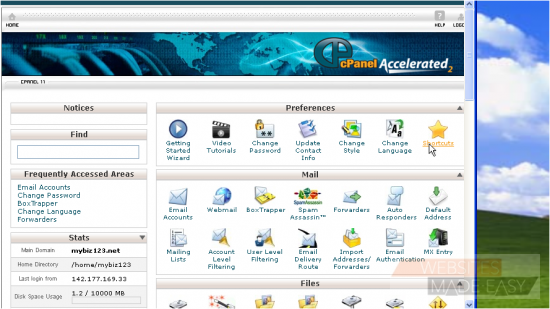
2) To create the shortcuts, simply click and drag these links to your desktop
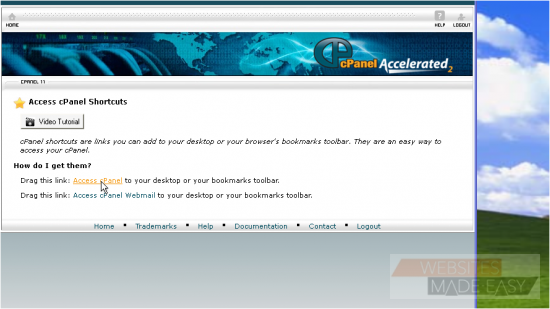
You can create shortcuts for accessing your cPanel control panel, and for direct access to your web mail
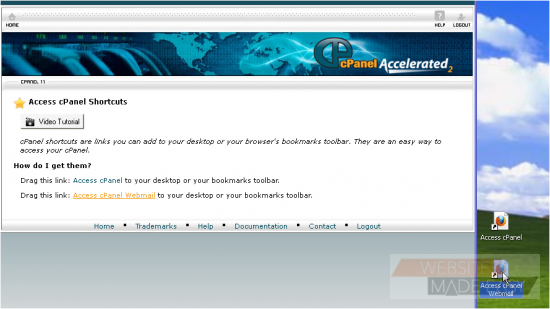
That's all there is to it!

This is the end of the tutorial. You now know how to create desktop shortcuts to your cPanel web mail and control panel.

  • 0 Utilizadores acharam útil
Esta resposta foi útil?

Artigos Relacionados

How to Login in to cPanel

This demo assumes you've already opened your browser, and entered your cPanel login URL Now...

How to create a POP email account in cPanel

This demo assumes you've already logged in to cPanel Now let's create a new POP email account...

How to set your default address in cPanel

This demo assumes you've already logged in to cPanel Now let's learn how to set our default...

How to setup an auto-responder in cPanel

This demo assumes you've already logged in to cPanel Now let's learn how to setup an email...

How to setup email forwarding in cPanel

This demo assumes you've already logged in to cPanel Now let's learn how to setup email...