
When you register a new domain with a new hosting account, the domain is automatically added to the hosting account and the DNS records passed through.
If you have an existing account, but register a new domain and get the following error, when doing a DNS Lookup, follow the steps below:
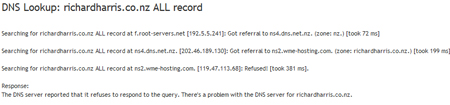
STEPS
- Check that you have set the nameservers for the domain to our namservers if you are going to host the domain with us. Our nameservers are: This is a required step to pass the DNS settings through to your new domain name.
- ns1.wsme-hosting.com
- ns2.wsme-hosting.com
- Check that you have added your domain to your existing hosting account as either a Add On Domain (host additional domains/websites from your account) or Parked Domain (allow you to "point" or "park" additional domain names to your existing website).
Please allow for 4- 48 hours for the DNS settings to delegate.