
How to upgrade your personal account to premier or business account
This tutorial will show you how to upgrade your PayPal account to a premier or business account
1) Click View Limits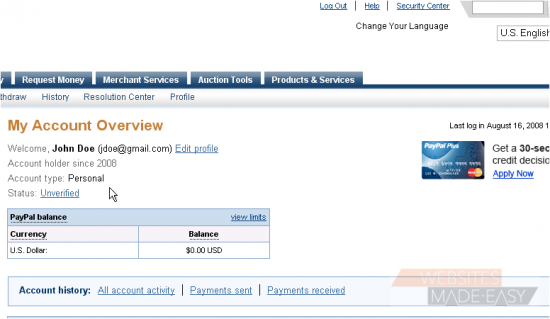
For security purposes, PayPal imposes a limit on the amount of money that you can receive in a personal account
2) Click Upgrade Account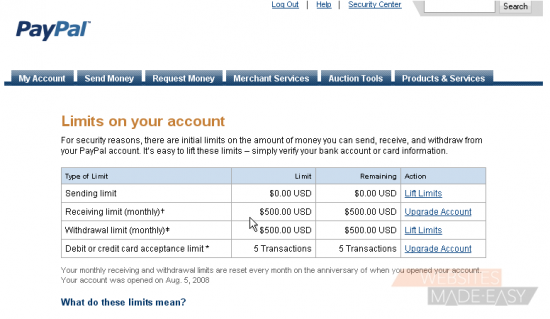
Depending on your needs, you can choose to upgrade to either a premier or business account. To read more about premier and business accounts, click the relevant links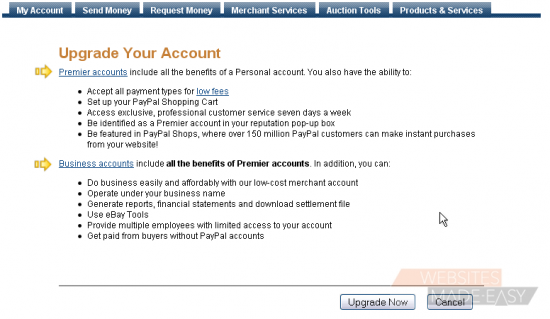
3) Click Upgrade Now
Premier accounts are recommended for individuals who buy and sell online, while business accounts are recommended for larger groups
4) Choose the account type you would like to upgrade to, then click the Continue button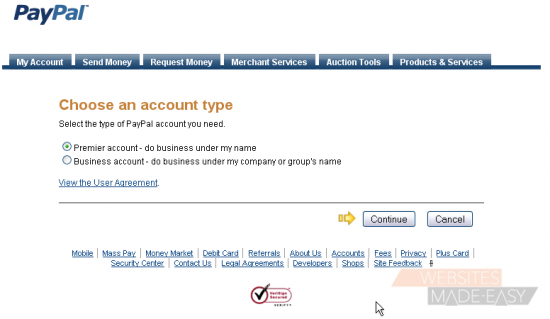
When upgrading to a business account, you will need the business owner's name, email, and address, as well as the business name and address, which you will be asked to enter once you click the Continue button
Your personal account will automatically be upgraded to a premier account once you click the Continue button
This is the end of the tutorial. You now know how to upgrade your account to a premier or business account